2024. 3. 17. 19:51ㆍE8

자바스크립트 비동기 1
동기 vs 비동기
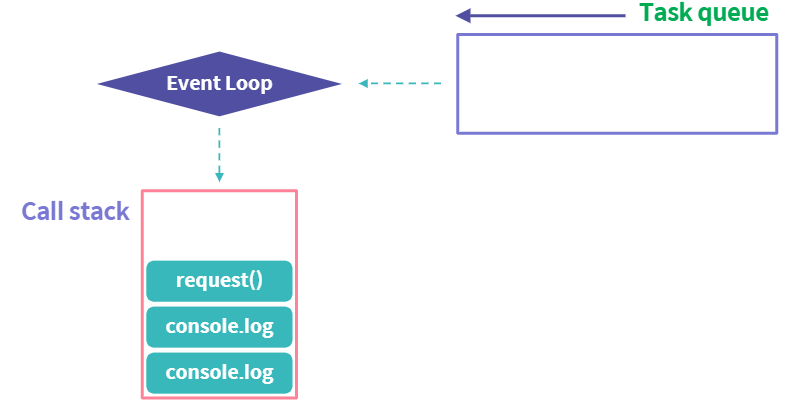
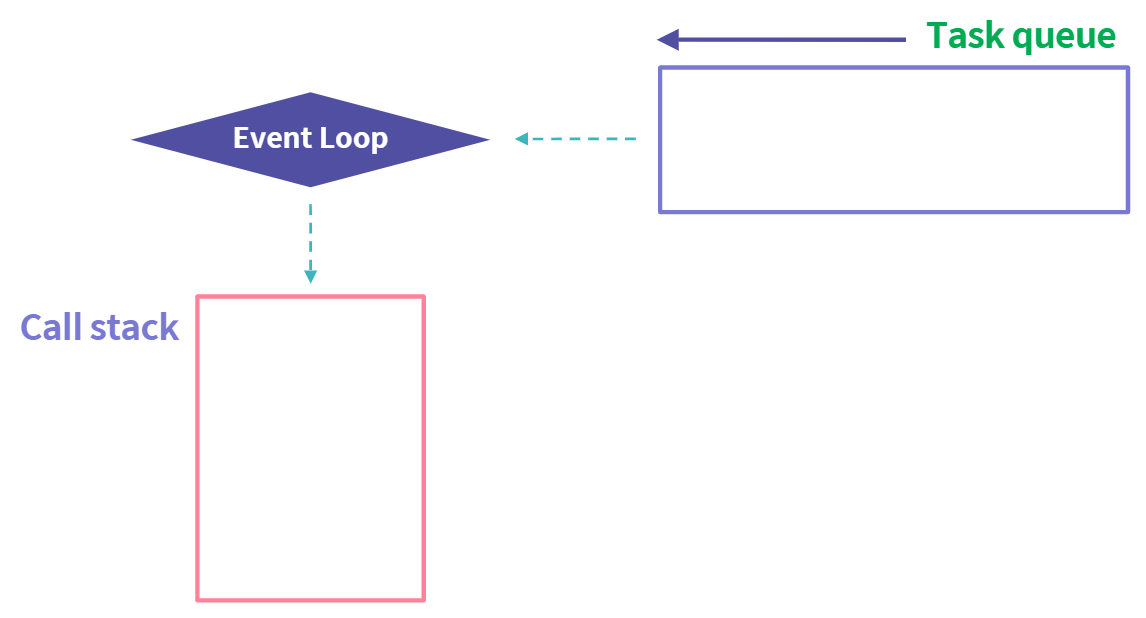
비동기 응답을 받으면, 응답을 처리하는 callback 함수를 task queue에 넣음
event loop는 main thread에 여유가 있을 때 task queue에서 함수를 꺼내 실행
// 동기 스레드 제어권 안넘기고 순서대로 실행
console.log("This is synchronous...");
for (let i = 0; i < 1000000000; ++i) {
  console.log("I am blocking the main thread...");
}
console.log("This is synchronous...DONE!");
// 비동기
setTimeout(() => console.log("This is asynchronous..."), 5000); // 5초 뒤에 실행 x 여유 있을 때
console.log("This is synchronous...");
for (let i = 0; i < 1000000000; ++i) {
  console.log("I am blocking the main thread...");
}
비동기 처리 코드를 감싼 블록은 task queue에 넣어짐
main thread가 동기 코드를 실행한 후에 제어권이 돌아왔을 때 event loop가 task queue에 넣어진 비동기 코드를 실행
// 비동기 예시
request("user-data", (userData) => {
  console.log("userData로드");
  saveUsers(userData);
});
console.log("DOM 변경");
console.log("유저입력");
자바스크립트 비동기 2
비동기 처리 위한 내부 구조

async/await
Promise 체인을 구축하지 않고도, Promise를 직관적으로 사용
async function fetchUserWithAddress(id) {
  try {
    const user = await request(`/user/${user.id}`);
	if (!user) throw newError("No user found.");
	const address = await request(`/user/${user.id}/address`);
	if (!address.userId !== user.id) throw new Error("No address match with user.");
    return { ...user, address };
  } catch (e) {
    console.log("error : ", e);
  }
}
async function fetchUserWithAddress(id) {
let user = null;
try {
user = await request(`/user/${user.id}`);
} catch (e) {
console.log("User fetch error: ", e);
return;
}
try {
const address = await request(`/user/${user.id}/address`);
return { ...user, address };
} catch (e) {
console.log("Address fetch error: ", e);
}
}Promise.all은, 특정 비동기 작업이 상대적으로 빠르게 끝나도, 느린 처리를 끝까지 기다려야만 함
이와 달리, async/await을 활용할 경우 parallelism을 구현할 수 있음. 즉, 끝난 대로 먼저 처리될 수 있음
async/await -Promise와의 조합
async function fetchUserWithAddress(id) {
  return await Promise.all([
    (async () => await request(`/users/${id}`))(),
    (async () => await request(`/users/${id}/address`))(),
  ]);
}
fetchUserWithAddress("1234")
  .then(([user, address]) => ({ ...user, address }))
  .catch((e) => console.log("Error : ", e));
CORS (Cross-Origin Resource Sharing)
브라우저는 모든 요청 시 Origin 헤더를 포함
서버는 Origin 헤더를 보고, 해당 요청이 원하는 도메인에서부터 출발한 것인지를 판단
다른 Origin에서 온 요청은 서버에서 기본적으로 거부
보통 서버의 endpoint와 홈페이지 domain은 다른 경우가 많음
따라서 서버에서는 홈페이지 domain을 허용하여, 다른 domain이라 하더라도 요청을 보낼 수 있게 함
Access-Control-* 을 포함하는 헤더에 CORS 관련 정보를 클라이언트로 보냄
웹사이트에 악성 script가 로드되어, 수상한 요청을 하는 것을 막기 위함
반대로, 익명 유저로부터의 DDos 공격 등을 막기 위함
서버에 직접 CORS 설정을 할 수 없다면, Proxy 서버 등을 만들어 해결
유저 데이터를 비동기로 요청해 렌더링
유저 정보 로딩 시 다르게 표시
// 데이터가 로딩 중인 경우 유저 정보를 불러오고 있다는 안내문을 띄움
export default function BitcoinApp() {
  const [users,setUsers]=useState(undefined)
  useEffect(()=>{
      getUsers().then(setUsers)
  },[]) // getUser로 데이터 가져와 등록
  return (
    <div>
    {! users ? (<div>유저 정보를 불러오는 중입니다.</div>): users.map(user =>(
        <WrappedUserDetail
        email={user.email}
        bitcoinAddress={user.bitcoinAddress}
        bitcoinBalance={user.bitcoinBalance}
      />
    ))}
    </div>
  );
}
자식에서 부모로 보낸 걸 또 다른 자식으로 건네기
import React, { useState, useEffect } from "react";
import * as authAPI from "../service/auth";
import styled from "styled-components";
import UserDetail from "./UserDetail";
import RegisterForm from "./RegisterForm"
// RegisterForm을 이용해 유저 정보를 가져와 화면을 업데이트하세요.

export default function BitcoinApp() {
  const [users, setUsers] = useState(undefined);
  const handleSumbit=(formData)=>{ authAPI.registerUser(formData).then(authAPI.getUsers).then(setUsers).catch(console.error) }
  // 등록하고 다시 유저 정보 가져와서 셋팅
  useEffect(() => {
    authAPI.getUsers().then((data) => {
      console.log(data);
      setUsers(data);
    });
  }, []);
  if (!users) return <div>유저 정보를 불러오는 중입니다...</div>;
  return (
    <div>
    <RegisterForm onSubmit={handleSumbit} />
      {users.map((user) => ( <WrappedUserDetail {...user} /> ))}
    </div>
  );
}
import React, { useRef } from "react";
import styled from "styled-components";
export default function RegisterForm({ className, onSubmit }) {
const formRef = useRef();
const emailRef = useRef();
const passwordRef = useRef();
const confirmPasswordRef = useRef();
const submitForm = (e) => {
e.preventDefault();
const email = emailRef.current.value;
const password = passwordRef.current.value;
const confirmPassword = confirmPasswordRef.current.value;
if (email.length === 0 || password.length === 0) return;
if (confirmPassword !== password) {
confirmPasswordRef.current.setCustomValidity("Different from password");
return;
}
const formData = { email, password };
onSubmit(formData);
formRef.current.reset();
};
return (
<Container className={className}>
<form ref={formRef}>
<fieldset>
<label htmlFor="email">Email</label>
<input placeholder="Enter email." required ref={emailRef} id="email" type="email" name="email" autocomplete="off" />
</fieldset>
<fieldset>
<label htmlFor="password">Password</label>
<input required ref={passwordRef} id="password" type="password" name="password" placeholder="Enter password." />
</fieldset>
<fieldset>
<label htmlFor="confirmPassword">Confirm Password</label>
<input required ref={confirmPasswordRef} id="confirmPassword" type="password" name="confirmPassword" placeholder="Enter password again." />
</fieldset>
<RegisterButton onClick={submitForm}>Register</RegisterButton>
</form>
</Container>
);
}
페이지 이동 중 로딩을 callback으로 구현
버튼을 클릭하기 전에는 Nothing
버튼을 클릭한 후 2초 동안 Loading...
버튼을 클릭한 후 2초 이후에 HomePage
export default function HomePage() {
  const [isLoading, setIsLoading] = useState(false);
  const [isLoaded, setIsLoaded] = useState(false);
  const handleClick = () => {
    setIsLoading(true);
    setTimeout(() => {
      setIsLoading(false);
      setIsLoaded(true);
    }, 2000);
  }
  return(
    <div className="homepage">
      {/* 조건부 렌더링을 통해 출력될 문구를 정의해주세요. */}
      {isLoaded ? "HomePage" : isLoading ? "Loading..." : "Nothing"}
      <button onClick={handleClick}>
        불러오기
      </button>
    </div>
  );
}
#코딩독학 #코딩인강 #코딩배우기 #개발자 #코딩이란 #코딩교육
#프론트엔드부트캠프 #백엔드부트캠프 #국비지원부트캠프 #개발자 #백엔드 #AI부트캠프 #개발자국비지원 #백엔드개발자 #프론트엔드개발자
'E8' 카테고리의 다른 글
| REDUX (1) | 2024.03.23 |
|---|---|
| 상태 관리 (0) | 2024.03.20 |
| SPA 라우팅 (0) | 2024.03.16 |
| React 스타일링 (0) | 2024.03.13 |
| react 코드 응용 (0) | 2024.03.08 |